Eety reads the invention and writes down what it understood. Then it waits... nothing is searched until you approve the grading criteria. After that it runs the search a professional would run: keyword strings in two rounds, the portfolios of the companies in the field, the inventors behind the best hits, the citations around them, and the scholarly and web literature. Every string sits on the page with its reason, and every grade comes with its explanation.
5 tokens ($50) per search, charged once per matter when you approve the criteria. Prior-art search is enabled per organization on request.
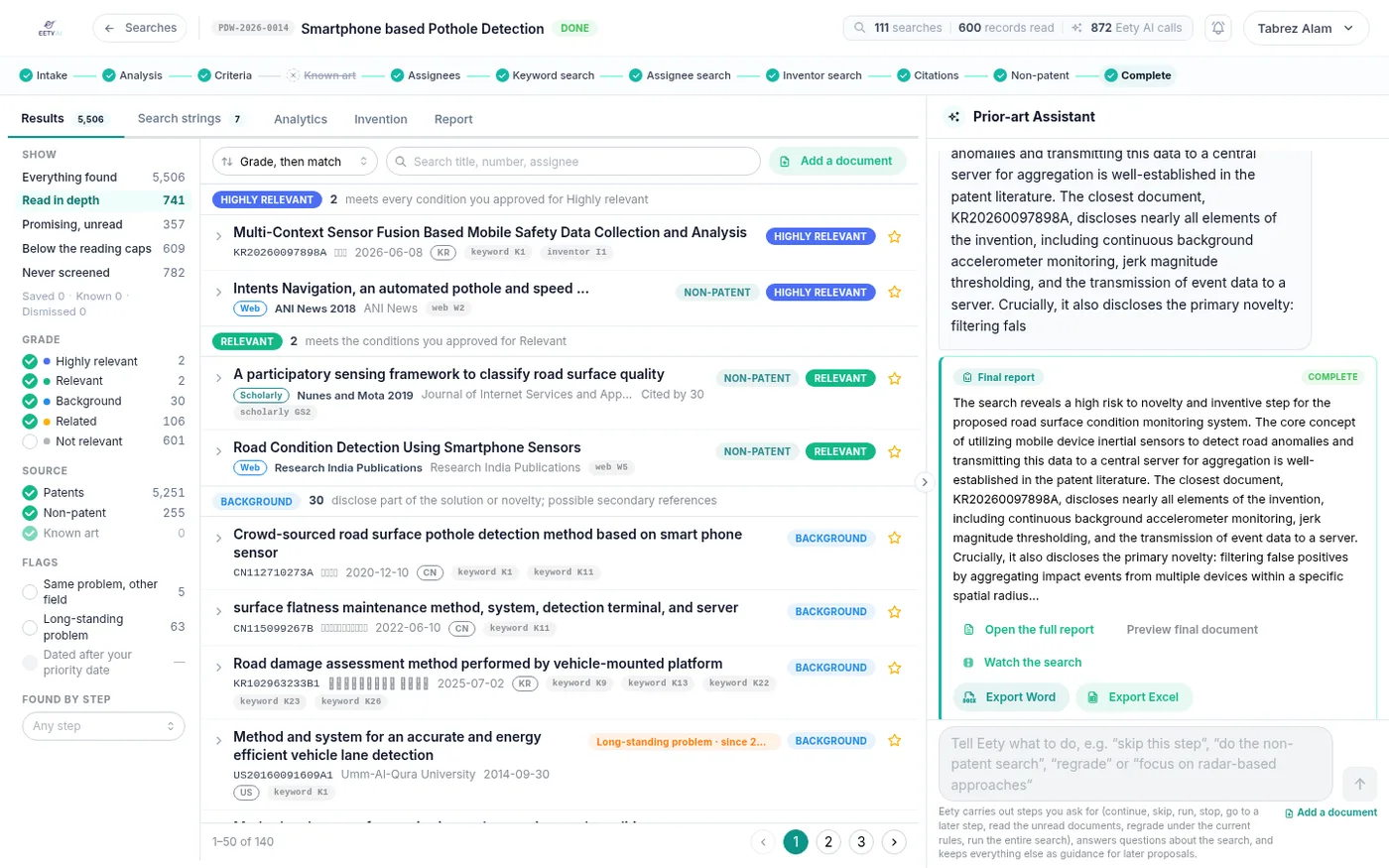
A finished search: 111 searches and 600 records read against the budget, 5,506 documents found, and every grade shown with the condition it met. The final report sits on the right, with Watch the search, Export Word and Export Excel.
Remember the math teacher who wanted to see your working, not just the answer? A right answer with no working got half credit, because nobody could tell whether you knew it or guessed it. A search report without its strings is that answer sheet. When you brief a search firm, what comes back is a PDF: a list of references, a relevance column, a paragraph on the closest ones. What does not come back is the search itself... which strings ran, in which fields, why those words, and what was screened out. If a reference turns up later, you cannot ask the PDF why it was missed :( So Eety keeps the search on the page, next to the results, where your team can read it, edit it and run it again.
You write a brief and ask a search firm for a quote. Then the scope goes back and forth by email, for a while.
A PDF arrives with a reference list and a relevance column. The strings that produced it are nowhere in it.
Counsel asks why one reference ranked above another. Nobody can say, because there is no record of the criteria that decided it.
A new brief, a new quote, the same wait... and nothing learned in the last search carries into this one.
Open a search on the invention's matter. Eety sets out the domain, problem, solution, novelty and inventive step; you confirm them or edit them.
You approve the grading criteria. Only now are 5 tokens taken; and if the search stops before anything is searched, they come back.
The eleven steps run, each string on the page with what it looks for and why. Watch it happen in the console, or just come back when it is done.
Open the Search strings tab, change a string or its scope, and run it again. Export the report as Word or Excel; the file is named with the matter reference.
This is the step rail you see at the top of every search. Three steps need you: confirm the analysis, approve the criteria, confirm the assignees. The rest run on their own; even then, every string they propose is on the page before it runs. The lines in quotes below are Eety's own words for each step, as they appear in the search.
Upload the disclosure just as the inventor wrote it. The search sits on the invention's matter, so it carries the same reference as the harvest and the draft (something like ACME-2026-0042), and the report is named after it.
"Reading your disclosure. I'll set out the domain, problem, solution, novelty and inventive step for you to confirm or edit."
Five headings, and you confirm or edit them before anything is searched. Everything downstream is written from these five, so this is the place to correct a misunderstanding... not after the results arrive.
"Before searching, confirm how documents will be graded: each grade is a combination of the invention's features. Review the combinations (add or remove features if you wish), then approve them. Eety's defaults are set."
Picture a cooking contest where the judges write the scoring sheet after tasting the food; the sheet would quietly bend toward the dish they liked. That is why the criteria come before the search. A document is Highly relevant when it meets every condition you approved for that grade, and the same rule holds for each grade below it. Approving the criteria is also the moment the search is paid for: 5 tokens, once per matter. Until then, you can still edit the understanding of the invention.
"Do you already know of any prior art? Upload files, paste links, publication numbers or text. Each item is reviewed against your invention and used first when spidering citations. You can also skip this step."
The references the inventor already cites, or the ones a harvest turned up, go in here. Later, they seed the citation step.
"Finding the companies active in this domain: a few broad domain searches to count who files the most, plus a list of known players. You'll confirm the list."
Add the competitors you know are filing in the field and strike the ones that are not. The list you confirm is the list the assignee search uses.
"Round 1: strings for the problem and the core mechanism, written from the analysis: the purpose and platform searched in titles and abstracts, the mechanism in the claims or the full text, plus full-text and claims-only strings for documents that word the purpose differently. The best hits teach me the vocabulary the literature uses. Round 2: targeted strings for each relationship of the invention, classification searches, more full-text and claims-only strings and copies for other patent offices. Up to 300 results per string are screened. Every string says what it looks for and why."
Round one is 3 to 6 strings; round two is 4 to 10. Each string has a scope (titles and abstracts, claims, or full text), and each one is on the page before it runs, with what it looks for and why. So you can edit it, change its scope or strike it before it ever runs.
"Searching the portfolios of the confirmed companies for the problem."
Same problem, different haystack: the filings of each company you confirmed in step 5.
"Searching other filings by the inventors of the most relevant documents."
The people behind the best hits usually have more than one filing to their name. Those other filings are read against the same criteria.
"Citation spidering: backward and forward citations and similar documents of the best results. Choose the seed documents."
Your known art goes in ahead of the best results. Every document found this way is labeled with the seed it came from, so you can trace how it got into the file.
"10 scholarly-literature searches for papers, theses and reports and 5 web searches for products, news and public disclosures. These documents are found mainly by their titles and abstracts, so the strings are short and use the words authors write there. Every result is screened on its title and summary; only promising ones are read in full."
A lot of prior art never went near a patent office. So this step covers eight source types: scholarly, web, apps, code, images, pharma, standards and videos.
"Writing the executive summary and preparing the report."
Five grades: Highly relevant, Relevant, Related, Background, Not relevant. Each one is shown with the condition it met from the criteria you approved. The report exports as Word or Excel with the matter reference leading the filename; and afterward, the Results, Search strings, Analytics, Invention and Report tabs stay open on the matter.
Next to every approval button sits "Run entire search". Press it and Eety, the mascot, walks the step rail as the steps run; hit cards appear as they are found, and the counters in the header tick against the budget. When it is done, "Watch the search" replays the run for whoever was not in the room :)
The "Run entire search" console: Eety on the step rail, the live log underneath, and hit cards arriving step by step. Replayed afterward with "Watch the search".
The Search strings tab with one keyword string open: its scope (titles and abstracts, claims or full text), what it looks for, why, what it will miss and what covers the gap, plus the edit and re-run controls.
Most AI search tools hand you a ranked list and ask you to trust it. A searcher asks something else: what did you look for, where, and why? Eety answers that for every string... what it looks for, why those words, what noise it will bring in, what it might miss, and what covers the gap. The string is the unit of the search; and you can edit it before it runs.
Actually, let me back up a step. What makes a report something a searcher would put their name to is not polish; it is the method. So Eety writes the report the way a searcher writes one: the criteria, the strings with their rationale and scope, every grade with the condition it met, the closest art, and the limits of the search. The method sits on the page, not in someone's head.
What it is not: a legal opinion. It is a search tool that your own people use. The decision to file, and the opinion that supports it, stay with your patent attorney or outside counsel; the report gives them the search to base it on.
(smartphone OR "mobile device") AND (pothole OR "road surface") AND (detect* OR sens*)
Searching for
Documents that name the purpose and the platform where applicants name them: the title and abstract.
Likely irrelevant hits
Road-maintenance systems with no phone involved; general vehicle sensing.
What it might miss, and the cover
Filings that word the purpose differently. Covered by the claims-only and full-text strings in the same round.
Illustrative layout. In the product, every string carries its rationale, its scope and the results it produced, and you can edit it before it runs.
per search (5 tokens), charged once per matter when you approve the criteria.
steps, with the keyword search run in two rounds.
results screened per string, at most.
scopes for a string: titles and abstracts, claims, full text.
scholarly and web literature searches, across 8 non-patent source types.
relevance grades, each shown with the condition it met.
default budget per search: searches, patent-record reads, page reads.
report formats, Word and Excel, with the matter reference in the filename.
It is the search a professional would run, carried out by your own IP team, with the method on the page: criteria approved before anything is searched, keyword strings in two rounds with their rationale and scope, assignee, inventor, citation and literature steps, and a report with every grade explained. It is not a legal opinion. Whether to file, and the opinion that supports that decision, stay with your patent attorney or outside counsel; the report gives them the search to work from.
One search on one matter, charged once, at the moment you approve the grading criteria. From there, the search runs within a default budget of 200 searches, 600 patent-record reads and 60 page reads. If it stops before it has run a single search against the databases, the tokens go back to your balance; resume it later and they are charged again. One token is $10, so a search is $50.
Yes, and you should. Every string is proposed before it runs, with what it looks for, why, and its scope (titles and abstracts, claims, or full text). Edit it, change the scope, strike it or add your own, then approve the batch. Or just tell Eety what to do in plain words: skip a step, run the non-patent search, regrade, or focus the search on a particular approach.
Patent literature through Google Patents, with copies of the best strings for other patent offices, and classification searches running alongside the keyword strings. Non-patent literature through Google Scholar and the open web, across eight source types: scholarly, web, apps, code, images, pharma, standards and videos. The searches themselves are placed through SerpApi. Known art you upload, and the citations spidered from it, come from the same records.
Three things. The text of the invention goes to Google Gemini through Vertex AI for the analysis, the strings and the grading. Search strings and publication numbers go to Google Patents, Google Scholar and the open web through SerpApi; the disclosure itself is never sent to a search engine. The literature steps fetch public web pages directly. The results, the strings, the report and the audit trail stay in your database, in our cloud or in your own deployment.
An inventor sees the searches linked to the inventions they created or are named on, read-only: the results, the grades and the report, not the controls. Running the search is the IP team's job. The IP team's areas stay closed to R&D roles, and prior-art search itself is enabled per organization on request.
A state-of-the-art search and a prior-art density verdict on every disclosure, for 2 tokens, before any drafting or search money is spent.
Explore harvesting → Next: Patent draftingTemplates for 5 patent offices, drawings generated with the draft, a 90 percent understanding gate. 5 tokens per matter.
Explore drafting → Also: Draft reviewImport the Word file, get every finding with its authority cited, and export a tracked-changes redline. 3 tokens, once per matter.
Explore review → The platformLifecycle home, decision queue, departments and roles, matter references, and outside counsel recorded on the record without a seat.
Explore the platform →In the demo we run the opening steps on an invention of yours: the analysis, the criteria, and round one of the strings with their reasons. Prior-art search is enabled per organization on request, so ask for it there. Individuals can start on the other services today with 25 free tokens. We keep looking for a simpler way to show what a search actually did; so far, putting the strings on the page is the closest we have come.