Patent Review

QC any patent draft, even the ones eety did not write.

Upload your outside counsel's DOCX. Eety reviews every section in parallel, cites the statute behind each finding, and exports a tracked-changes Word redline you can send straight back. 3 tokens ($30), charged once per matter, rerun free as the vendor revises.

Start Free

Reviews against templates for 5 patent offices: USPTO, EPO, PCT/WIPO, UKIPO, IPO India. 25 free tokens at signup ($250 of work). No credit card.
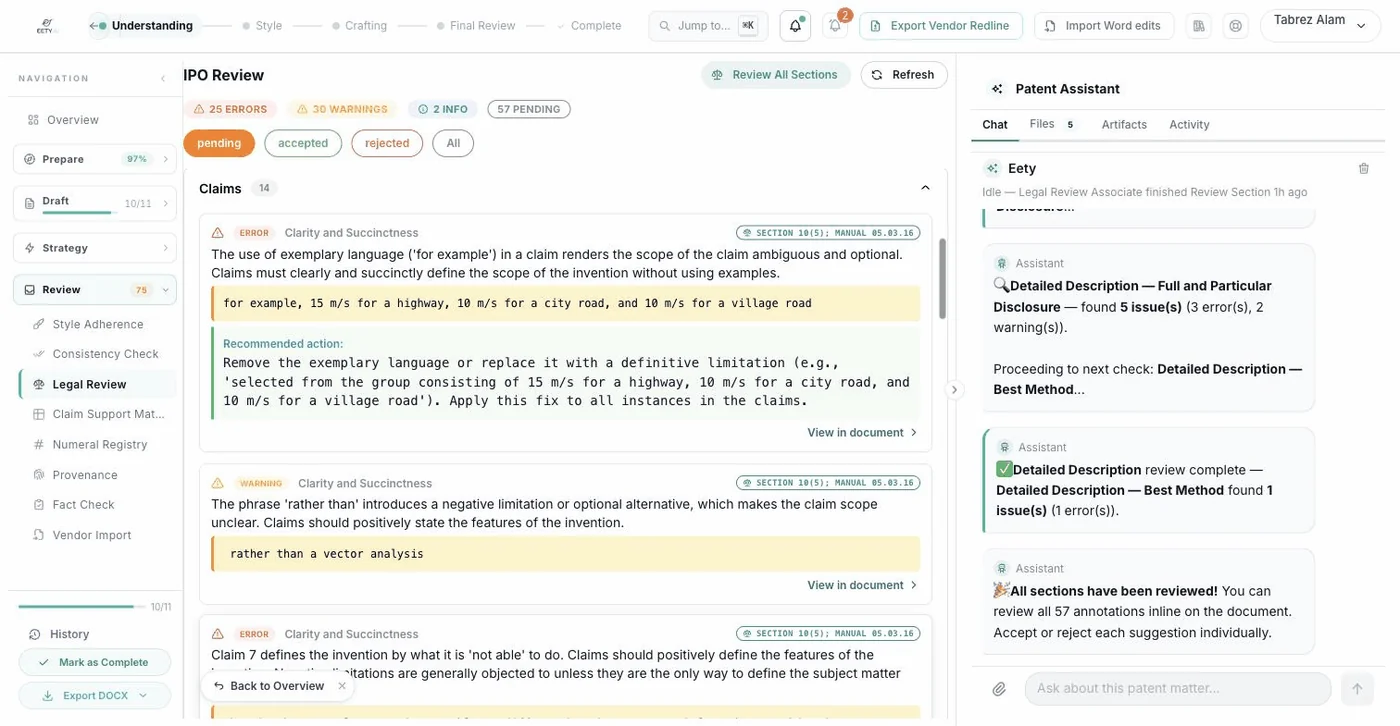
A vendor draft under review: findings pinned to the claims they concern, each citing its provision.
A vendor draft under review: findings pinned to the claims they concern, each citing its provision.
Before and After

The week in the review pile, or one afternoon at the document.

You paid thousands for that draft. The QC it gets should not depend on whose desk it landed on and what else landed there the same week.

The Old Way
  1. Day 1

    The vendor's draft lands in the inbox. It joins the review pile behind three other matters.

  2. Day 3

    A senior attorney reads it end to end, checking claim support, antecedents, and numbering by eye.

  3. Day 4

    Figure labels get cross-checked against the description. The statute gets pulled up to word the objections properly.

  4. Day 5

    The markup gets typed into an email or a comment sheet, sent back, and the wait for the revision begins.

  5. Next Week

    The revised draft arrives. The whole pass starts again, usually with less patience than the last one.

With eety
  1. Minute 0

    Upload the vendor's DOCX exactly as it arrived, with the drawing sheets or PPT alongside.

  2. The Mapping

    Sections map onto the jurisdiction template automatically. An India Form 2 front page is detected and skipped, not reviewed as if it were the spec.

  3. The Review

    The full legal review battery runs across every section in parallel. Minutes, not a place in the queue.

  4. The Findings

    Errors, warnings, and info per section, each quoting the offending text and citing the provision it offends. You accept or reject each one.

  5. The Redline

    Export a tracked-changes DOCX with every edit attributed by name, and send it back the same afternoon. When the revision arrives, rerun at no extra charge.

How It Works

Six steps from vendor DOCX to returned redline.

1

Upload the vendor's files

It is the same handoff you would make to a second reviewer: forward exactly what the vendor sent, nothing retyped, nothing reformatted. Upload the DOCX draft as it arrived, plus the drawing sheets or the PPT of figures if they came separately.

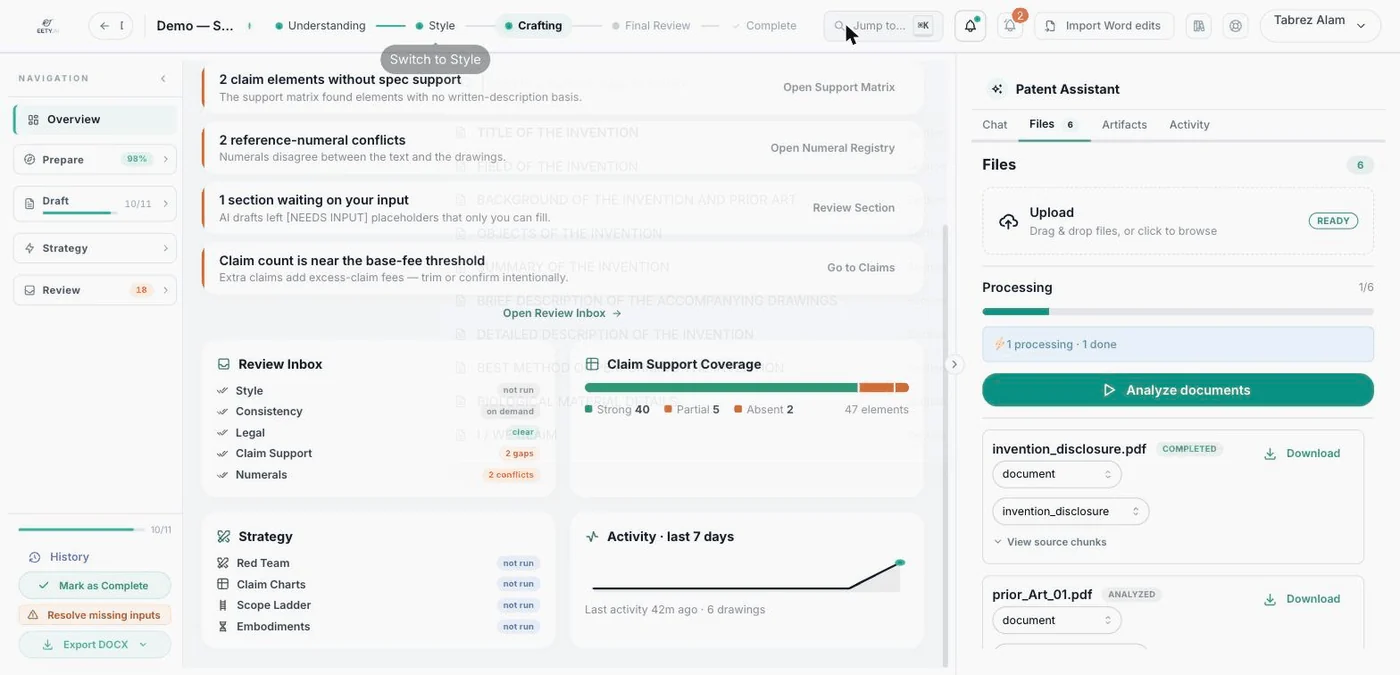
The vendor DOCX and its drawing sheets uploaded into a review matter, untouched from the email they arrived in.

The vendor DOCX and its drawing sheets uploaded into a review matter, untouched from the email they arrived in.

2

Mapped onto the template

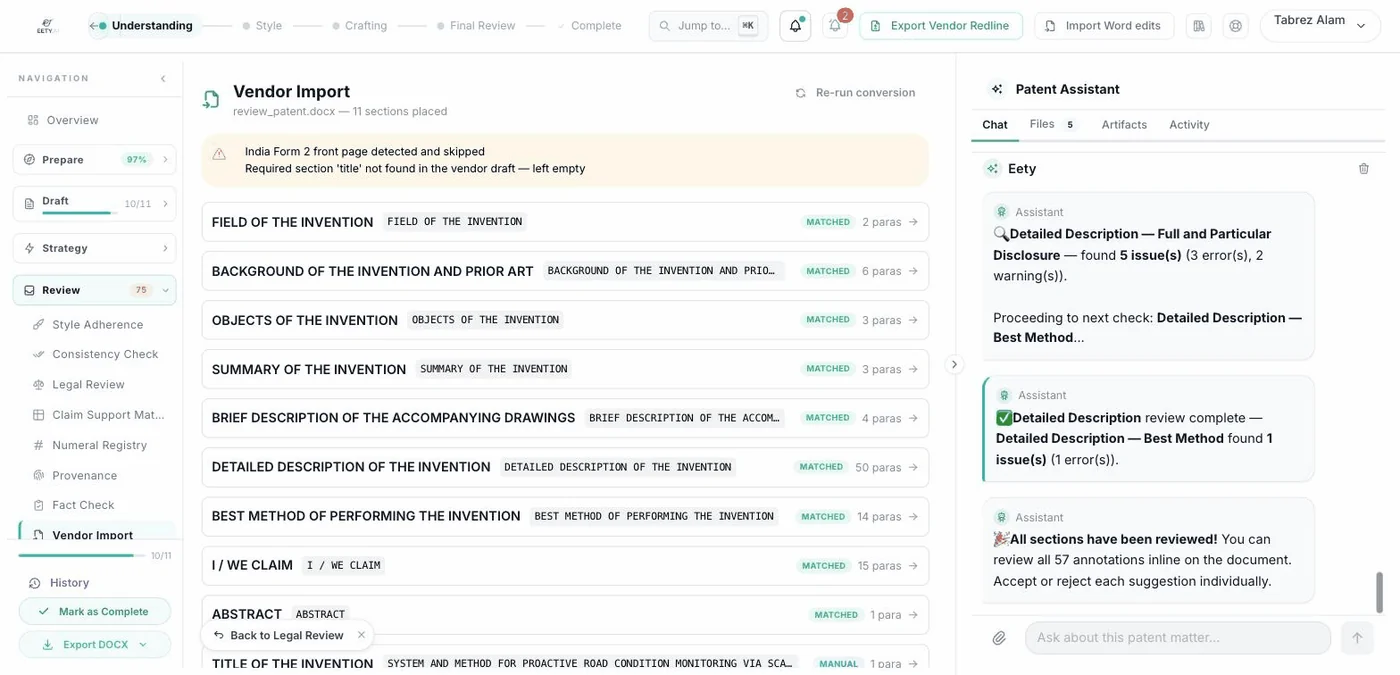
Before a partner reads a stack of pages, a paralegal sorts them into the right folders. Eety does that sort automatically: vendor headings are matched onto the jurisdiction template's sections, with a manual mapping panel for anything ambiguous. An India Form 2 front page is detected and skipped on its own.

The mapping panel: vendor headings matched onto the template sections, one left for manual assignment, the Form 2 front page skipped.

The mapping panel: vendor headings matched onto the template sections, one left for manual assignment, the Form 2 front page skipped.

3

The review battery runs

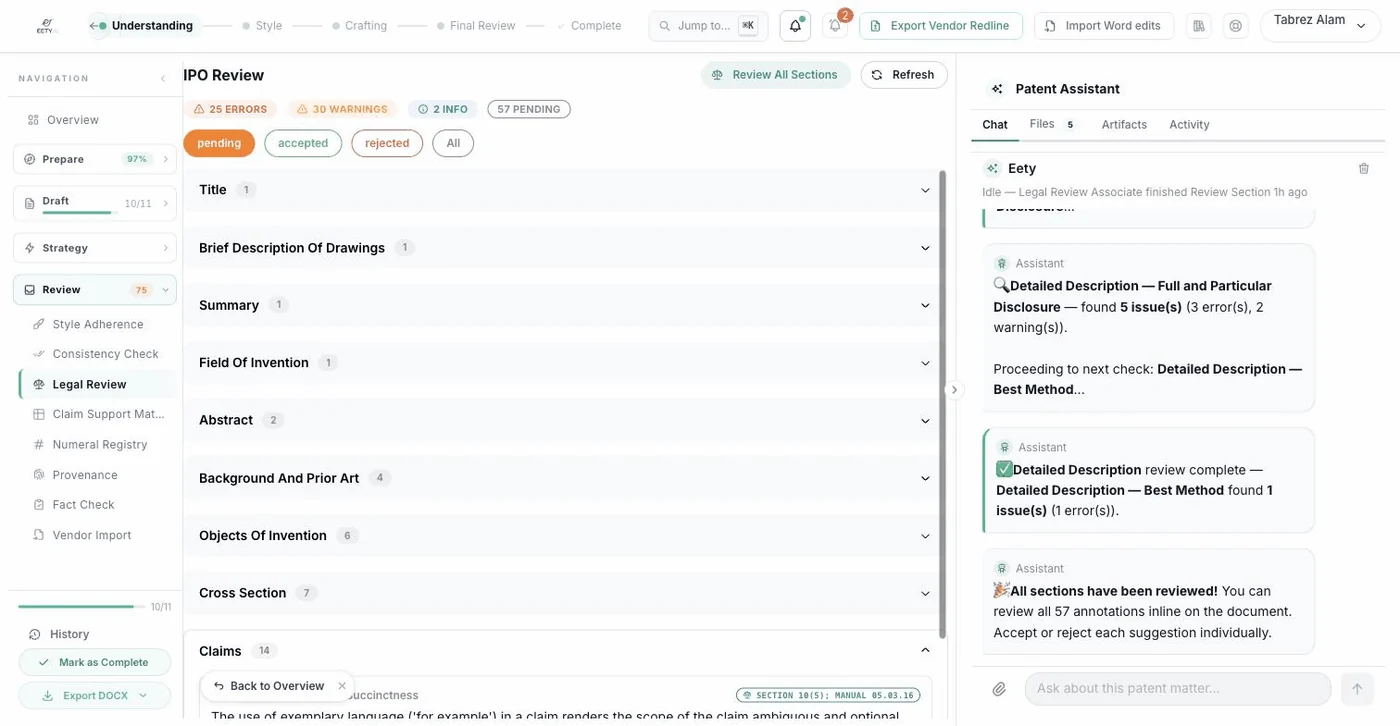
Picture handing each section of the draft to a different specialist at the same table, at the same moment. The full legal review battery runs across every mapped section in parallel, so the claims, the description, and the abstract are all being checked at once instead of waiting their turn.

The review dashboard: every section reviewed, findings graded as errors, warnings and information.

The review dashboard: every section reviewed, findings graded as errors, warnings and information.

4

Findings that cite their source

A good senior's margin note does three things: quotes the sentence, names the rule, and says what to do about it. Every finding arrives that way, graded error, warning, or info per section, with the offending text quoted, the statute or manual provision cited (Indian Patents Act Section 10(5), the Manual of Patent Office Practice), and a recommended action attached.

A claims error: the offending text quoted, Section 10(5) cited, and the recommended fix beneath it.

A claims error: the offending text quoted, Section 10(5) cited, and the recommended fix beneath it.

5

Accept or reject, at the document

You would not let a junior rewrite a vendor draft unsupervised, and eety does not ask you to. Each suggestion sits next to the text it concerns, and you accept or reject it there, one by one. Nothing enters the redline that you did not approve.

Findings graded as errors, warnings and information, each accepted or rejected at the paragraph it concerns.

Findings graded as errors, warnings and information, each accepted or rejected at the paragraph it concerns.

6

Send back a real redline

The document your vendor gets back is the one they know how to act on: a tracked-changes Word file, the kind that opens straight into the review pane. Every accepted edit carries the reviewer's name, so the vendor sees exactly who required what, exactly where.

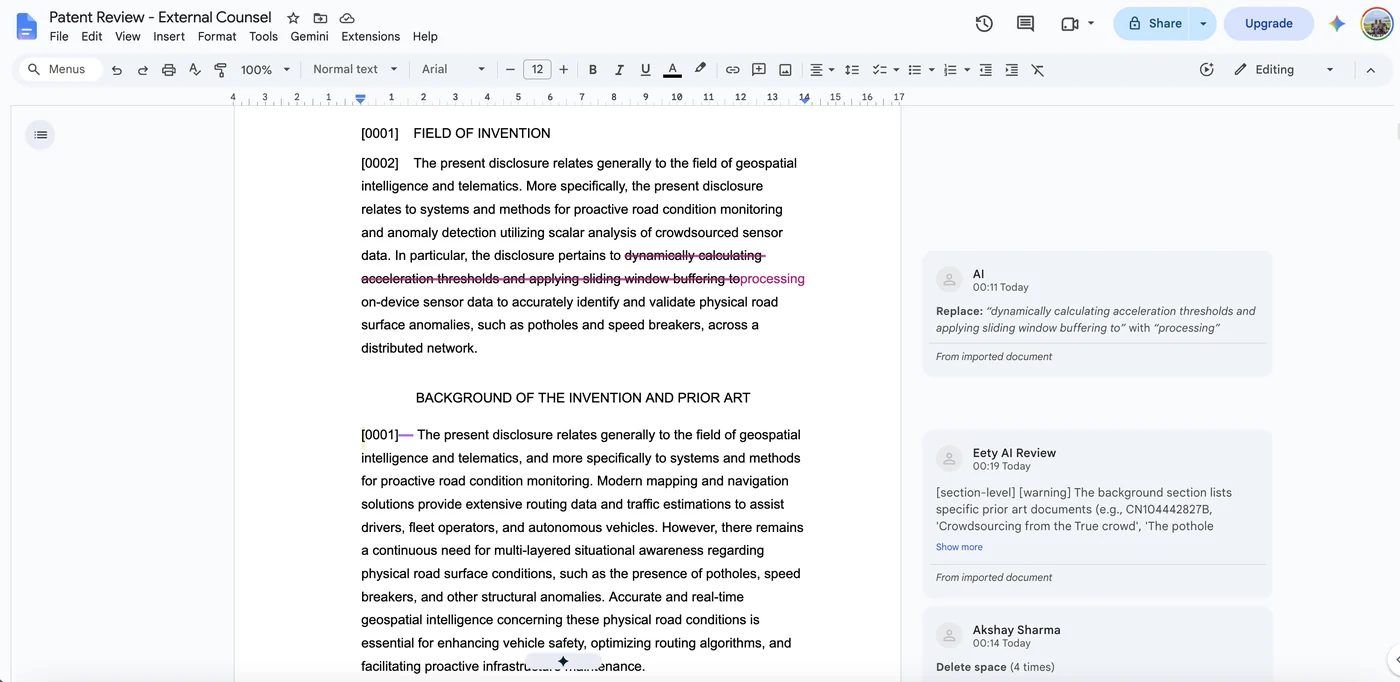
The exported redline opened by its recipient: an insertion replacing struck-through text, with each change and comment attributed by name.

The exported redline opened by its recipient: an insertion replacing struck-through text, with every change and comment attributed by name.

Why This Is Different

Built to review work eety did not write.

Most drafting tools review their own output, the way a student grades their own homework. We have not found another tool built to take a draft it did not write, review it against the office's own statute, and hand a genuine tracked-changes DOCX back to outside counsel. If you find one, book a demo and show us. Until then, here is what you can check yourself.

Checkable Claim 1

Any DOCX, not just ours.

Nothing in the flow assumes eety drafted the document. Upload the last draft your outside counsel sent, as it arrived, and watch it map onto the template sections.

Checkable Claim 2

Findings cite chapter and verse.

Each finding quotes the offending text and names the provision behind it, such as Indian Patents Act Section 10(5) or the Manual of Patent Office Practice. Look any citation up and check it against the quoted text.

Checkable Claim 3

The redline is a real redline.

Export the review and open it in Word. It is a tracked-changes DOCX, every edit attributed by reviewer name, ready for the vendor's accept and reject buttons. No proprietary viewer, no PDF of screenshots.

3 tokens

$30 to QC a draft you paid thousands for. Charged once per matter; rerun on every vendor revision at no extra charge.

Minutes

The full multi-section review battery runs across every section in parallel, not one section after another.

Cited

Findings name the provision they rest on, such as Indian Patents Act Section 10(5) or the Manual of Patent Office Practice.

5 offices

Drafts are mapped and reviewed against jurisdiction templates for USPTO, EPO, PCT/WIPO, UKIPO, and IPO India.

FAQ

The questions in-house teams actually ask.

Does it work with our outside counsel's Word files? +

Yes, that is the point. DOCX in, tracked-changes DOCX out. The vendor's headings are auto-matched onto the jurisdiction template's sections, a manual mapping panel handles anything ambiguous, and an India Form 2 front page is detected and skipped automatically. Your vendor never has to change how they draft.

Do we have to accept its edits? +

No. Every suggestion is accepted or rejected individually, at the annotation level, next to the text it concerns. The exported redline contains only the edits you accepted. Rejecting a finding costs nothing and hides nothing; it stays in the record as rejected.

Does it handle drawings? +

Drawing sheets are ingested alongside the draft, including figures that arrive as a PPT, and figure labels are checked against the description. If the spec refers to a figure the sheets do not carry, or the labels disagree, that surfaces as a finding like any other.

Which patent offices are covered? +

Five: USPTO, EPO, PCT/WIPO, UKIPO, and IPO India. The draft is mapped onto the selected office's template, including the 11-section India Complete Specification, and the review cites that office's provisions in its findings.

What does a review cost? +

3 tokens, which is $30 of Eety power, charged once per matter for the review service no matter how many times you rerun it. Signup comes with 25 free tokens ($250 of work) and no credit card, enough to put 8 vendor drafts through review before paying anything.

What happens when the vendor sends a revised draft? +

Upload the revision to the same matter and run the review again. Because the service is charged once per matter, the rerun costs nothing, so you can hold the vendor to the same standard on round three as on round one.

The Full Loop

Decide what to patent. Draft it. Verify everything.

Put the last vendor draft you received through it.

25 free tokens at signup, no credit card. At 3 tokens per review, that is 8 vendor drafts QC'd before you pay anything, each one returned as a real Word redline.

Start Free