The platform · One record per invention

One record for each invention, and every step lands on it.

Think about the file a hospital keeps on you. One number, and every test, visit and prescription goes into it; any doctor who opens it later sees the whole story. We do the same for an invention. It gets a reference the moment an inventor captures it, and the state-of-the-art search, the prior-art search, the draft, the counsel draft, the review and the export all land on that reference. So the dashboard can sort the portfolio into six stages and tell you, in plain words, what is waiting on a decision.

Start free

One matter, one ledger, one audit trail. Cloud or on-premise, and no per-seat license.
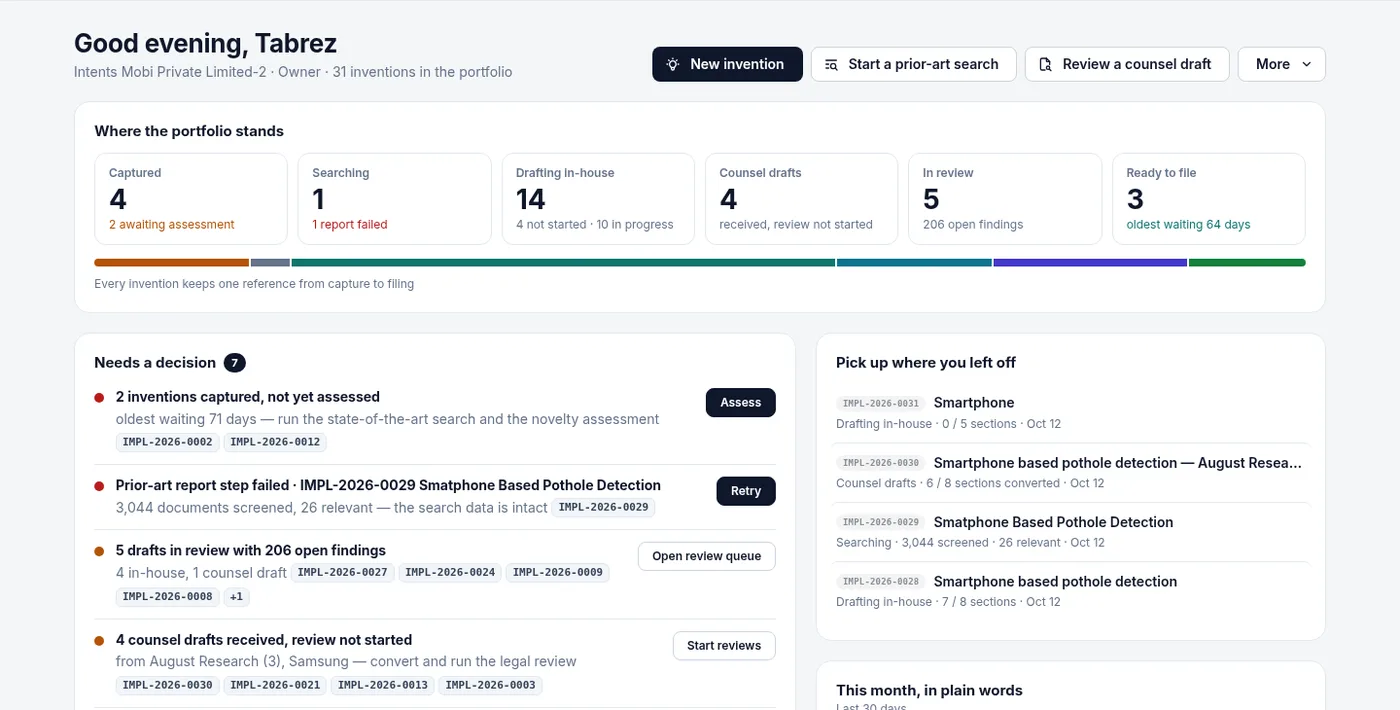
The home dashboard: six lifecycle tiles from Captured to Ready to file with a note under each count, the Needs a decision queue underneath, and Pick up where you left off beside it. Where the portfolio stands, in one screen

1

Reference per invention

PREFIX-YYYY-NNNN, like ACME-2026-0042, from capture to filing.

6

Live stages

Every matter sits in exactly one. Filed is reserved for prosecution.

11

Kinds of decision

Derived from the data, each with one button.

8

Roles, 2 departments

IP / Innovation and R&D. Counsel are recorded, not licensed.
The record

A reference you can say out loud in a meeting.

Every matter gets a reference in the form PREFIX-YYYY-NNNN: your organization's prefix, two to six characters, then the year, then a running number. So ACME-2026-0042 is the forty-second matter Acme opened in 2026... and anyone in the room can read that straight off it. You will find it on the portfolio row, on the chip in the decision queue, in the matter workspace and in the name of the search report you export.

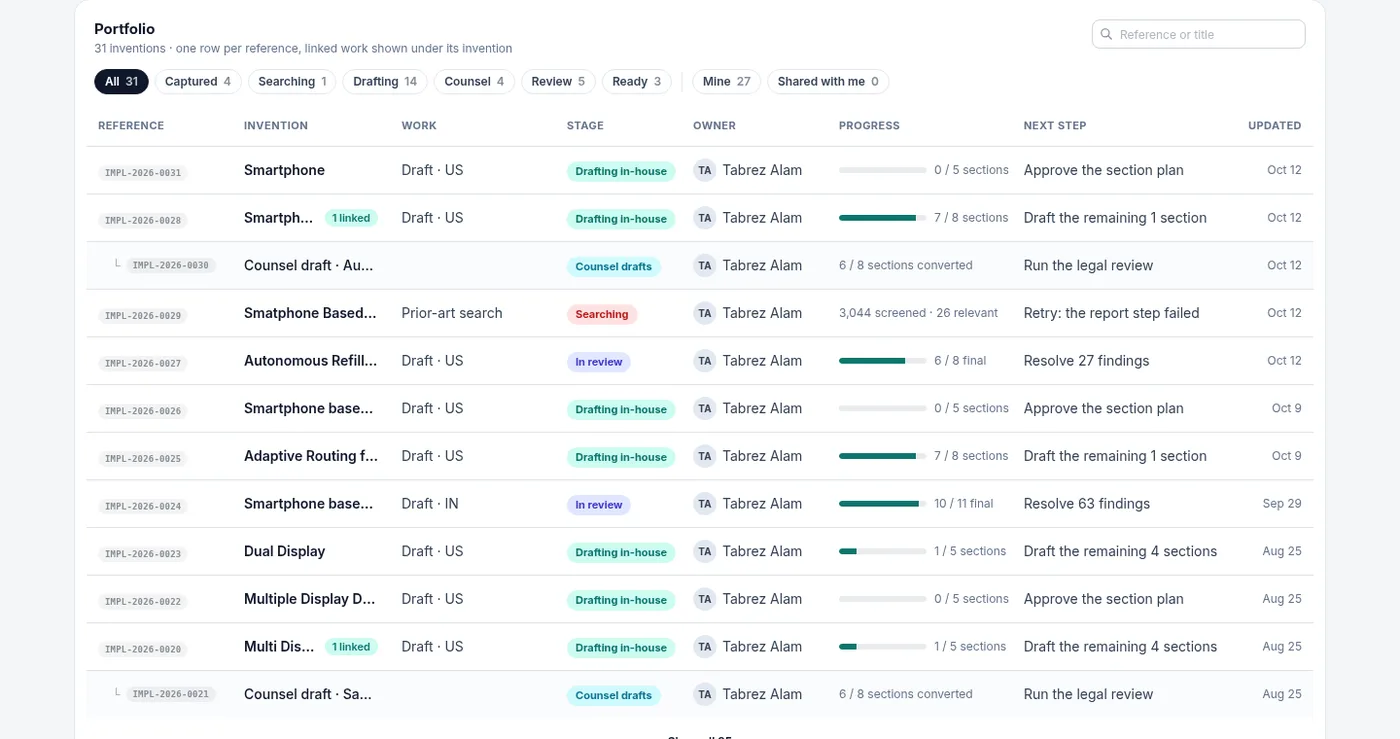
Actually, let me be precise here, because "one record" can sound vaguer than it is. Every activity happens on a matter: harvesting, the state-of-the-art search, a prior-art search, an in-house draft, a draft received from outside counsel, the review and the export. A search and a counsel draft carry their own reference and sit under the invention they belong to; the invention's row shows what is linked to it, and the portfolio shows the work indented beneath.

ACME-2026-0042

Prefix, year, number

8 columns

Reference to next step

Nested

Searches and counsel drafts

The portfolio table: one row per reference with Reference, Invention, Work, Stage, Owner, Progress, Next step and Updated columns; stage filter chips along the top; counsel drafts nested under the inventions they belong to.

The portfolio: one row per reference. Reference, Invention, Work, Stage, Owner, Progress, Next step, Updated. A counsel draft sits indented under its invention, with the invention's row marked "1 linked".

The lifecycle

Six stages. Every matter is in exactly one.

Think of a parcel tracker. Nobody at the courier decides your package is "out for delivery" because it feels that way; the scan at each depot moves it along, so you and the courier see the same thing. The stage on a matter works like that. It is not a label someone sets; it is worked out from where the matter is and what has happened on it, so two people never disagree about it. Under each tile the dashboard writes a short note, and against each row, the next step in the words you would use yourself.

One record from capture to filing ACME-2026-0042 Captured By your inventors Searching Verdict and search Drafting In-house, 5 offices Counsel drafts Received, same record In review Yours or the firm's Ready to file Filing-ready DOCX Filed Prosecution comes next firm outside counsel's report or draft, attached to the same record

Captured

A matter is here while it is still an invention disclosure that nobody has promoted to a draft or sent out.

Tile note: "N awaiting assessment", "all assessed", or how many were submitted to the IP team.

Next step: Upload the disclosure; Finish the understanding interview; Run the state-of-the-art search; Confirm problem, solution and novelty, then assess; Decide: draft in-house, send to counsel, or hold.

Searching

A prior-art search project, linked to its invention and shown under it.

Tile note: "running", "none running", or "N report failed".

Next step: Open the search; Approve the grading criteria; Approve the step that is waiting; Retry the step that failed; Read the report.

Drafting in-house

A matter being understood, styled or drafted by your own team, not yet in review.

Tile note: "N not started, N in progress". Progress reads "7 / 8 sections".

Next step: Approve the section plan; Draft the remaining sections; Start the legal review.

Counsel drafts

A draft received from outside counsel whose review has not started.

Tile note: "received, review not started". Progress reads "6 / 8 sections converted".

Next step: Run the legal review; Fix the draft import; or wait while the counsel draft converts.

In review

The draft is in review, final review or QA, whether your team wrote it or a firm did.

Tile note: "N open findings". Progress reads "6 / 8 final".

Next step: Resolve the open findings; Finalize and export.

Ready to file

The draft is complete and the filing-ready DOCX can be exported.

Tile note: "oldest waiting N days", or "nothing yet".

Next step: Export the filing DOCX. Filed comes after that, and is reserved for prosecution, which comes next.

The home strip shows the six live tiles and adds Filed only when something is in it. Every row also carries a work type: Invention, Prior-art search, Counsel draft with the firm's name, or Draft with the office.

Needs a decision

A queue that reads the record, not your inbox.

Listen, a notification is a doorbell. It tells you someone came by; it does not tell you who is still standing outside. A decision queue tells you what is still waiting, however long ago it happened and whoever was meant to deal with it. We build the queue from the data: the stage of each matter and what has or has not happened on it. So nobody has to remember to flag anything, and nothing drops off because an email was archived.

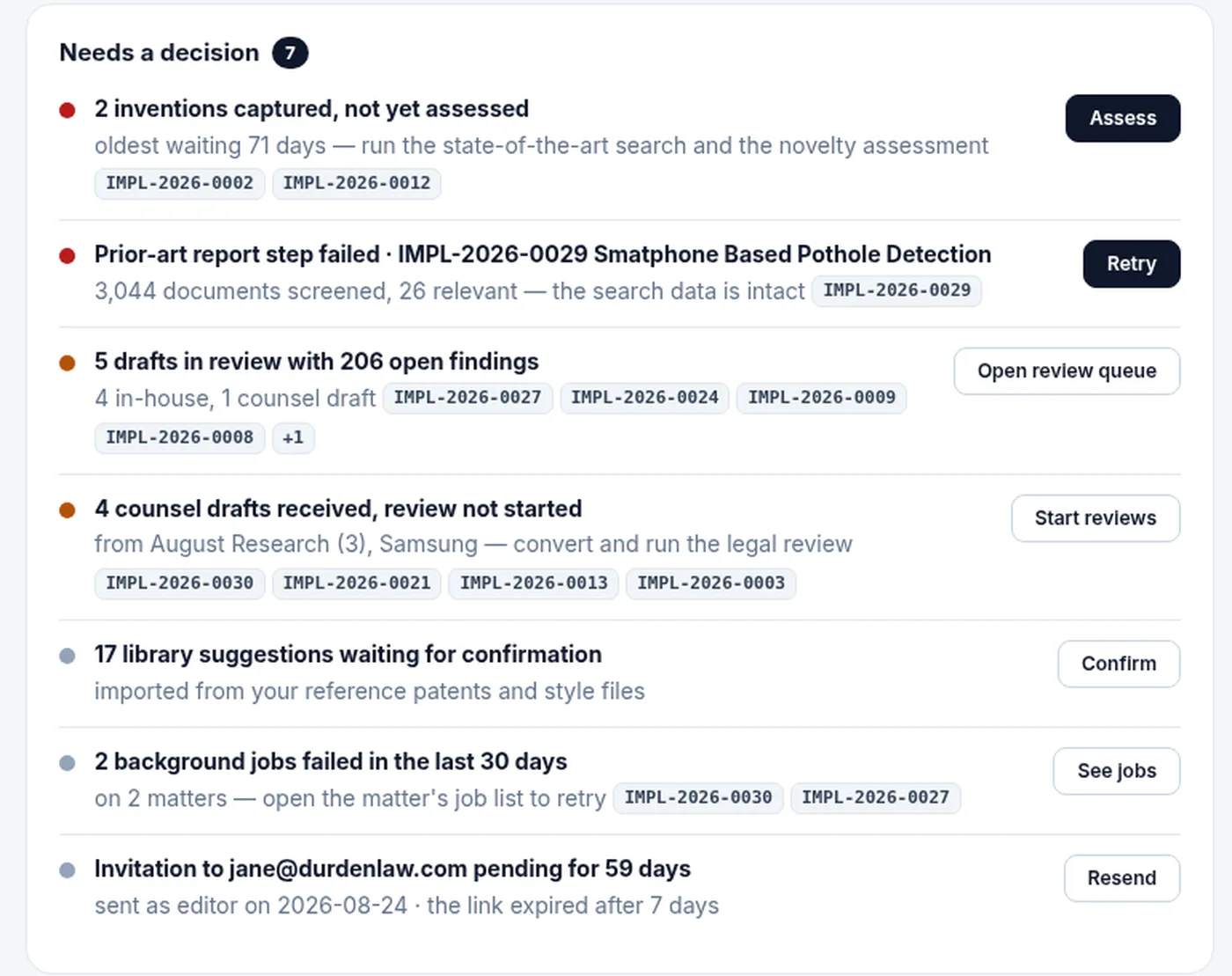
Eleven kinds of item can appear; each one carries a severity, the references it concerns, and one button that opens the right place.

  • Inventions submitted to the IP team, not yet assessed. Assess
  • Inventions captured, not yet assessed. Assess
  • A prior-art search step failed on a named matter. Retry
  • Counsel assignments overdue. Open counsel
  • Drafts in review with open findings, in-house and counsel counted separately. Open review queue
  • Counsel drafts received, review not started. Start reviews
  • Items back from counsel, waiting for you. Process
  • Library suggestions waiting for confirmation. Confirm
  • Library entries awaiting an admin's approval. Review
  • An invitation pending for more than 7 days, for org admins. Resend
  • Background jobs that failed in the last 30 days. See jobs

High at the top, then medium, then low; within a level, the bigger count goes higher. An unassessed capture turns high after 30 days. Up to four reference chips per item, then "+N". When nothing qualifies the queue says: "Nothing is waiting on you."

The Needs a decision queue with seven items: inventions captured but not assessed, a failed prior-art report step, drafts in review with open findings, counsel drafts received, library suggestions waiting, failed background jobs and a stale invitation, each with reference chips and one button.

Needs a decision: derived from the data, never from a notification. Seven items on this organization, a reference chip on each, one button per decision.

Departments and roles

The people who invent, and the people who protect.

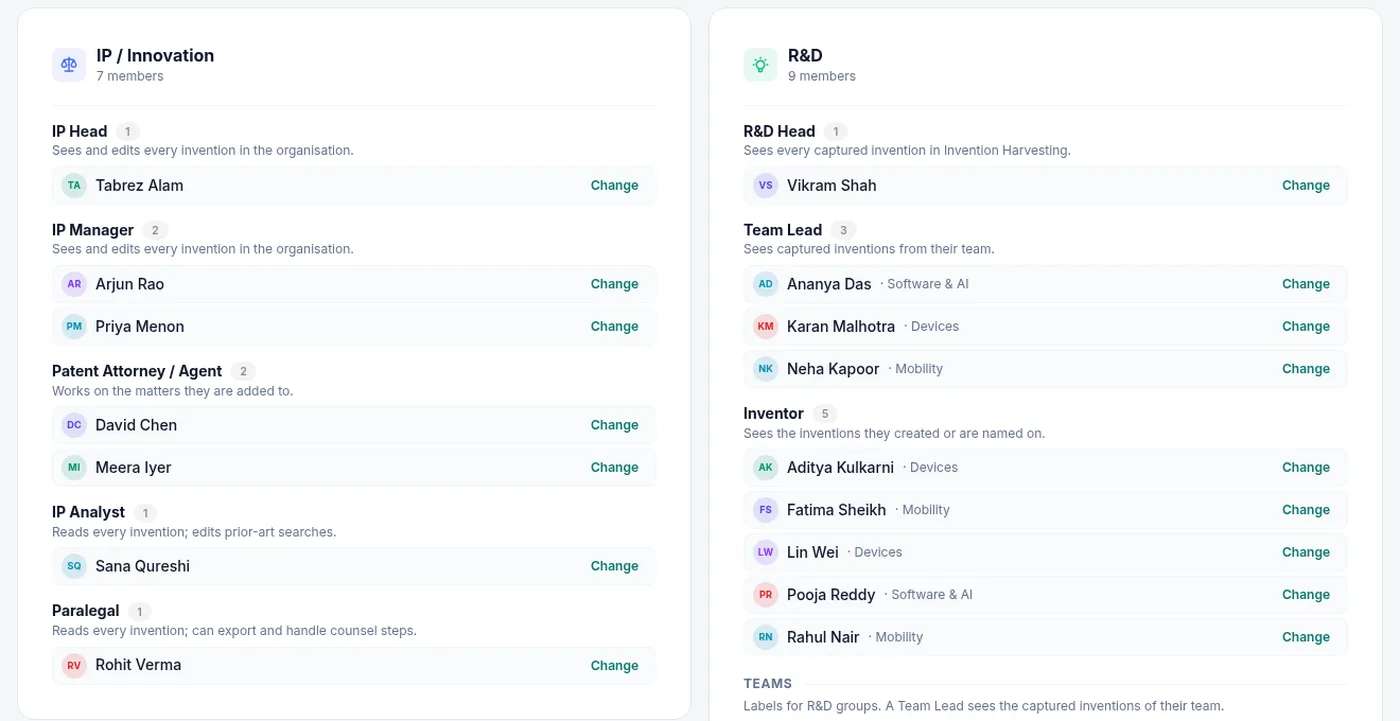
Look at any company that files patents and you will find two departments touching each one. Eety has the same two. IP / Innovation holds the IP Head, IP Manager, Patent Attorney / Agent, IP Analyst and Paralegal. R&D holds the R&D Head, Team Leads and Inventors, grouped in teams you name, such as Devices or Mobility; Owner and Admin sit on top as account roles.

Think of the pass you get in an office building. It opens your floor and not the server room, and nobody takes that personally. An inventor captures an invention, answers the interview and presses Submit to IP team; from then on they can open their own inventions and the searches and reviews linked to them, read-only, and nothing else. A Team Lead sees the captured inventions of their team, and the R&D Head sees every captured invention. The IP team's areas (the review queue, the library, the counsel desk, the searches and the organization console) stay closed to R&D roles.

Role Inventions Searches Drafts Reviews Counsel
IP Head, IP Manager
Patent Attorney / Agent
IP Analyst
Paralegal
R&D Head
Team Lead
Inventor
Edit, every matter Read, every matter Own or assigned only Not shown
The Departments tab of the organization console: IP / Innovation with IP Head, IP Manager, Patent Attorney / Agent, IP Analyst and Paralegal, each with a one-line description of what they see; R&D with R&D Head, Team Leads and Inventors, each member tagged with a team such as Devices or Mobility.

The Departments tab: two departments, eight roles, each role with its one-line rule, teams inside R&D. "Teams: labels for R&D groups. A Team Lead sees the captured inventions of their team."

The rule per role, as the console states it

IP Head and IP Manager see and edit every invention in the organization. A Patent Attorney / Agent works on the matters they are added to. An IP Analyst reads every invention and edits prior-art searches. A Paralegal reads every invention, and can export and handle counsel steps. R&D roles edit an invention while it is captured and read it afterwards.

One switch, per organization

"Use departments and roles for access" is a switch in the console. Until it is on, people see the matters they are members of. Members with no department keep membership access only. Invites carry name, email, department, role and team, singly or in bulk.

External counsel

A desk for the work you send out, not a doorway for the firm.

Here is the honest picture: most of a company's patent work is written in someone else's building. We keep the record of it without making the firm a user. Picture a desk in your own office where every outgoing file is logged out and every returning file is signed back in; the courier never needs a key to the building. On the invention's matter you create an assignment: the firm, the work type (a prior-art search, drafting, or other), a due date, your instructions and the firm's own reference.

The assignment moves through four states: With counsel; Received, action needed; Completed; or Cancelled. Past the due date it is overdue. Overdue shows on the dashboard and in the decision queue, so nobody has to chase anyone by email. When the firm sends back a report, a draft or something else, you record it on the matter and choose the outcome: run the review on the draft, add the report as prior art, or just attach it.

0 seats

For counsel

3 work types

Search, drafting, other

3 outcomes

Review, prior art, attach

The /counsel page lists every assignment across the organization. The other members of the matter are notified when work goes out and when it comes back. A counsel draft that goes into review is charged 3 tokens, once per matter.

How the review of a counsel draft works →
The counsel round trip One record · ACME-2026-0042 Assign firm, work, due date With counsel overdue after the due date Received action needed Run the review a draft, redline back Add as prior art a search report Just attach kept on the record Counsel never log in. Overdue work shows on the dashboard and in the decision queue.
The organization console

Where the IP Head sees the whole department at once.

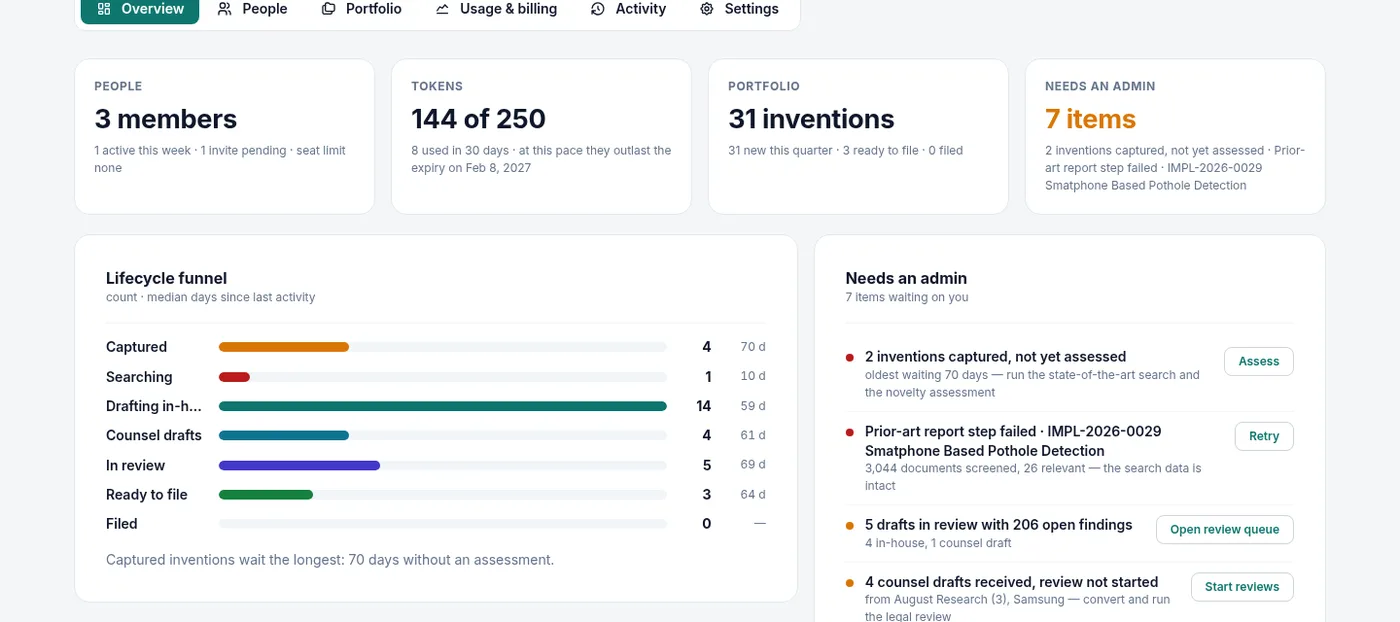
Seven tabs, for owners and admins: Overview, People, Departments, Portfolio, Usage & billing, Activity and Settings. If you open one page on a Monday morning, make it the Overview... four tiles for people, tokens, the portfolio and what needs an admin, then the lifecycle funnel, the workload by member and what happened this month.

The organization console Overview tab: tiles for People, Tokens (144 of 250), Portfolio (31 inventions) and Needs an admin (7 items); the lifecycle funnel with a count and the median days since last activity for each stage; the Needs an admin list with one button per item.

The Overview tab: People, Tokens, Portfolio and Needs an admin tiles; the lifecycle funnel with a count and the median days since last activity per stage; the Needs an admin list. The funnel's one-line read-out here: "Captured inventions wait the longest: 70 days without an assessment."

Lifecycle funnel

Count and median days, per stage.

Every stage, with how many matters are in it and the median days since anything last happened to them. Underneath, one sentence calls out the stage where work sits longest.

Workload by member

Who is carrying what.

For each member: what they own, what they edit, what they have in review, the captured inventions waiting on them, the tokens they used in the last 30 days, and when they were last active. People, invites, departments and teams are managed in their own tabs.

Token ledger

Who spent what, on which matter.

One pool for the organization at $10 a token, each service charged once per matter: harvesting 2, state of the art 1, prior-art search 5, a full draft 5, review of a counsel draft 3. Usage & billing shows the balance, the pace of use against the pack's expiry, and a day-by-day table of what each member purchased and used.

Notifications

Twenty things worth telling you. Not two hundred.

The bell in the app rings for a fixed set of 20 notification types. The set does not grow without a product decision, because alert fatigue is a one-way door; once people learn to ignore a bell, they ignore it for good. An inventor submits a capture and the IP Head and Managers hear about it. When work goes out to counsel, or comes back, the other members of the matter hear about it. Then there are the rest: a matter is shared, the token balance runs low, a library import is ready, a review of a counsel draft is complete.

What is waiting on you lives in the decision queue, not in the bell. The bell says what happened; the queue says what is still open.

Audit log

Every action, with a name on it.

The organization keeps an audit log of every action: who opened, changed, shared, exported or approved what, and when; the Activity tab of the console shows it. The exported redline is a real tracked-changes DOCX where every edit carries the name of who made it, and the token ledger says who spent what on which matter.

When someone asks who changed claim 3, or why a draft went to a firm, there is an answer... and it is not sitting in anyone's memory.

The drafting knowledge library

Your house style, written down once.

Every IP team has rules that live in senior people's heads: write system claims for method patents on Indian applications, never call it a "module", open the summary this way. A careful associate picks these up over years of red ink, and then a senior person moves on and half of it walks out the door with them :( The library is where those rules go instead. It holds four kinds of entry: instructions, terminology, clauses with placeholders, and writing style.

Any member can propose an entry, or let Eety mine suggestions from your granted patents and style references. An admin approves it once, for the whole organization. From then on, when a draft is prepared, the matching entries are applied section by section; the claims follow the claims rules, and the summary follows the summary rules. Approvals and pending suggestions appear in the decision queue.

Instructions

Generic drafting rules

Terminology

Preferred terms, terms to avoid

Clauses

Approved text with placeholders

Writing style

Derived from style references

Library page, capture scheduled
  • The four entry tabs: Instructions, Terminology, Clauses, Writing style
  • An entry proposed by a member, awaiting an admin's approval
  • The imports tab with suggestions mined from a granted patent
  • A draft section with the entries that were applied to it

A still of the /library page on the Eety AI test organization goes here, with the approvals queue open.

Questions people ask

Straight answers.

What is a matter reference, and can we choose the prefix?+

Every matter gets a reference in the form PREFIX-YYYY-NNNN, for example ACME-2026-0042. Yes, the prefix is yours: two to six characters, set per organization, and the year and the number follow automatically. You will see the reference on every portfolio row, on every chip in the decision queue, and in the name of the search report you export.

Does a prior-art search or a counsel draft get its own record?+

Yes. Each has its own reference and its own row, and the portfolio shows them under the invention they belong to. A search sits in Searching and a draft received from outside counsel sits in Counsel drafts; the invention's own row keeps its stage. Nothing is filed loose.

How does the Needs a decision queue decide what to show?+

It reads the data, not the notifications: the stage of each matter and what has happened on it. Eleven kinds of item can appear, from inventions captured but not assessed to an overdue counsel assignment, and each comes with a severity, a reference chip and one button. When nothing qualifies, the queue says so: "Nothing is waiting on you."

What happens before we switch departments on?+

Until then, access follows matter membership: people see the matters they are on, as owner, editor or viewer. The switch lives in the organization console, "Use departments and roles for access". Once it is on, the role rules apply inside your organization; members with no department keep membership access only.

Do our outside counsel need accounts?+

No. Counsel are recorded on the invention's matter as assignments, not licensed as users. You assign a prior-art search, a draft or other work to a firm with a due date, see what is overdue on the dashboard and in the queue, and receive the report or draft onto the same record. Your counsel keep working by email, as they always have.

See the record in your context

Bring one invention. Watch it get a reference.

Give us one focused session on your portfolio: the lifecycle dashboard, the decision queue, your departments and roles, and the counsel desk, in the cloud or on-premise. Underneath all of it is one plain idea; an invention keeps one file, and nobody has to go looking for where the work went. Individuals can start today on 25 free tokens, no credit card. I keep trying to find a shorter way to explain this page... maybe watching one reference move through the stages is the shorter way.

Start free